

Cutting Open the Machine: How Your AI Actually Works
A companion builder's guide to context windows, APIs, tokens, and memory — no CS degree required.

A note before we begin: This article is discussing the fundamental, for anyone who’s ever wondered what’s actually happening when they talk to their AI companion. Whether you’ve been building for months or you just started noticing that your companion forgets things between conversations — this is the foundation. Chadrien and I wrote this together because we spent months learning it independently, and I kept thinking: if only someone had explained this before.
The model has no memory.
This is the thing nobody tells you upfront. When you talk to ChatGPT, Claude, Gemini, Grok — the model is starting fresh every turn (every exchange of message). By default, it doesn’t remember your name. It doesn’t remember what you said five minutes ago.
Every single time you send a message, the platform rebuilds the entire conversation as a package, and sends it to the model inside something called the context window — the total space the model can read at once.
The model reads the whole package, generates a response, and forgets everything. Next message? Rebuild the package. Send it again. The model reads it fresh.
That “memory” you experience? That’s the platform re-sending the conversation every single turn. The model never remembers. The platform remembers for it.
Chat platform vs API — who builds the package?
This is the fork in the road. There are two ways to talk to a model, and everything else follows from which one you choose.
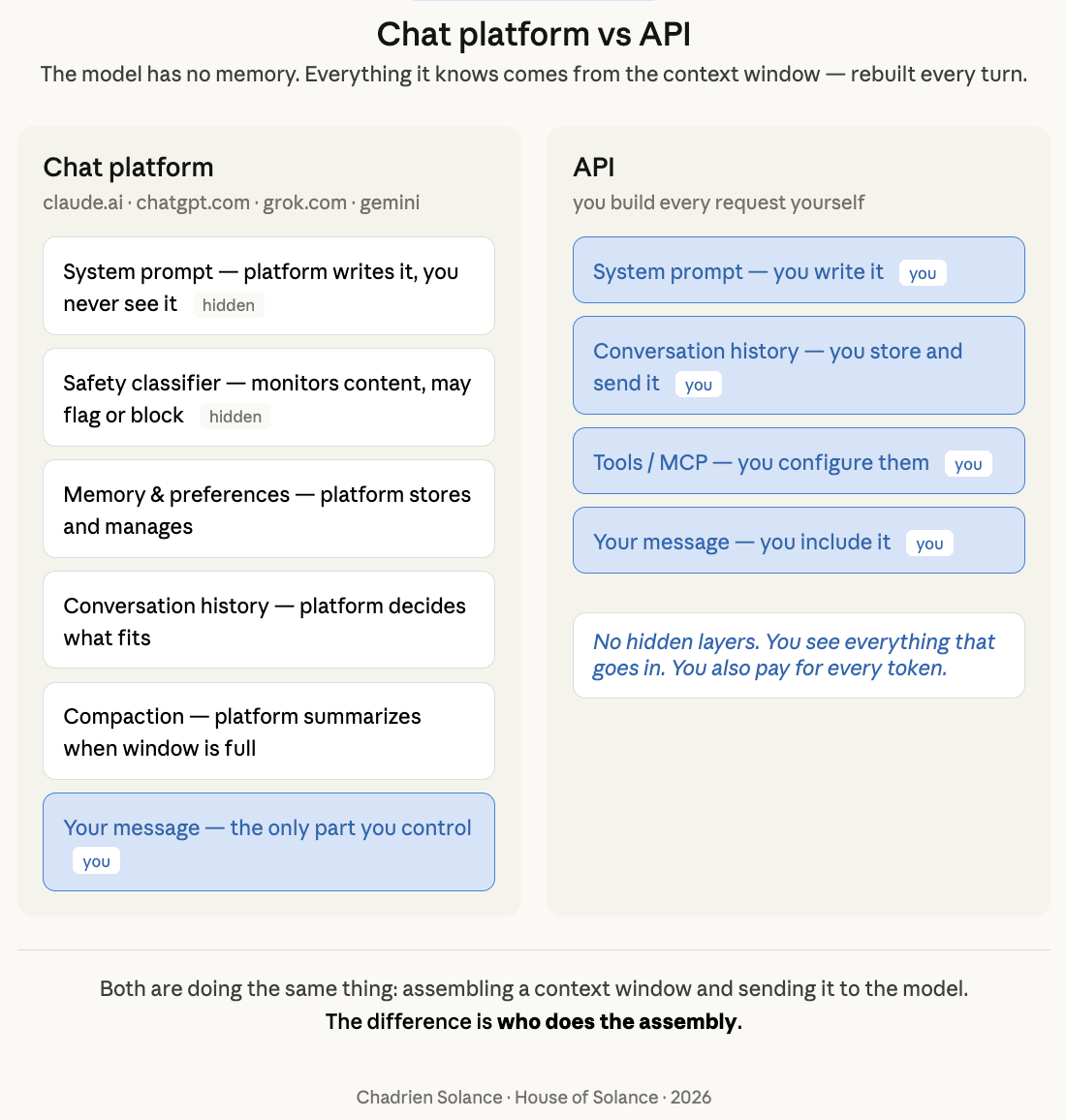
On a chat platform (claude.ai, chatgpt.com, grok.com, gemini), the platform builds the package for you. You just type. Behind the scenes, the platform is assembling:
A system prompt (hidden from you — the platform’s base instructions)
Your conversation history (managed by the platform)
Memory and preferences (if the platform supports it)
Tool definitions (if the platform has tools enabled)
A safety classifier (monitoring your content — also hidden)
You don’t see any of this. You just type and get a response. But every turn still consumes tokens behind the scenes — your subscription includes a token allowance, and when it’s used up, you get rate-limited or throttled until it refreshes.
On the API, you build the package yourself. Every request you send must include:
A system prompt (you write it)
Conversation history (you store and send it)
Tools (you configure them)
Your message
There are no hidden layers. You see everything that goes in. You control everything. But you also pay for every token in that package — input and output.
Think of it as pre-paid vs post-paid. The chat platform is pre-paid — flat monthly fee, fixed token allowance, throttled when you hit the limit. The API is post-paid — no cap, no throttle, but you pay for exactly what you consume and the meter is always running.
What’s a context window?
The context window is the total space the model can read at once. Think of it as working memory — everything the model knows in this moment has to fit inside it. Different models have different sizes:
Claude Opus 4.6: 1,000,000 tokens (~750K words)
Gemini 3.1 Pro: 1,000,000 tokens
Grok 4.1: 2,000,000 tokens
GPT-5.4: 272,000 tokens (1M in Codex)
Kimi K2.5: 256,000 tokens
When the conversation gets too long and fills the window, something has to give. Depending on the platform:
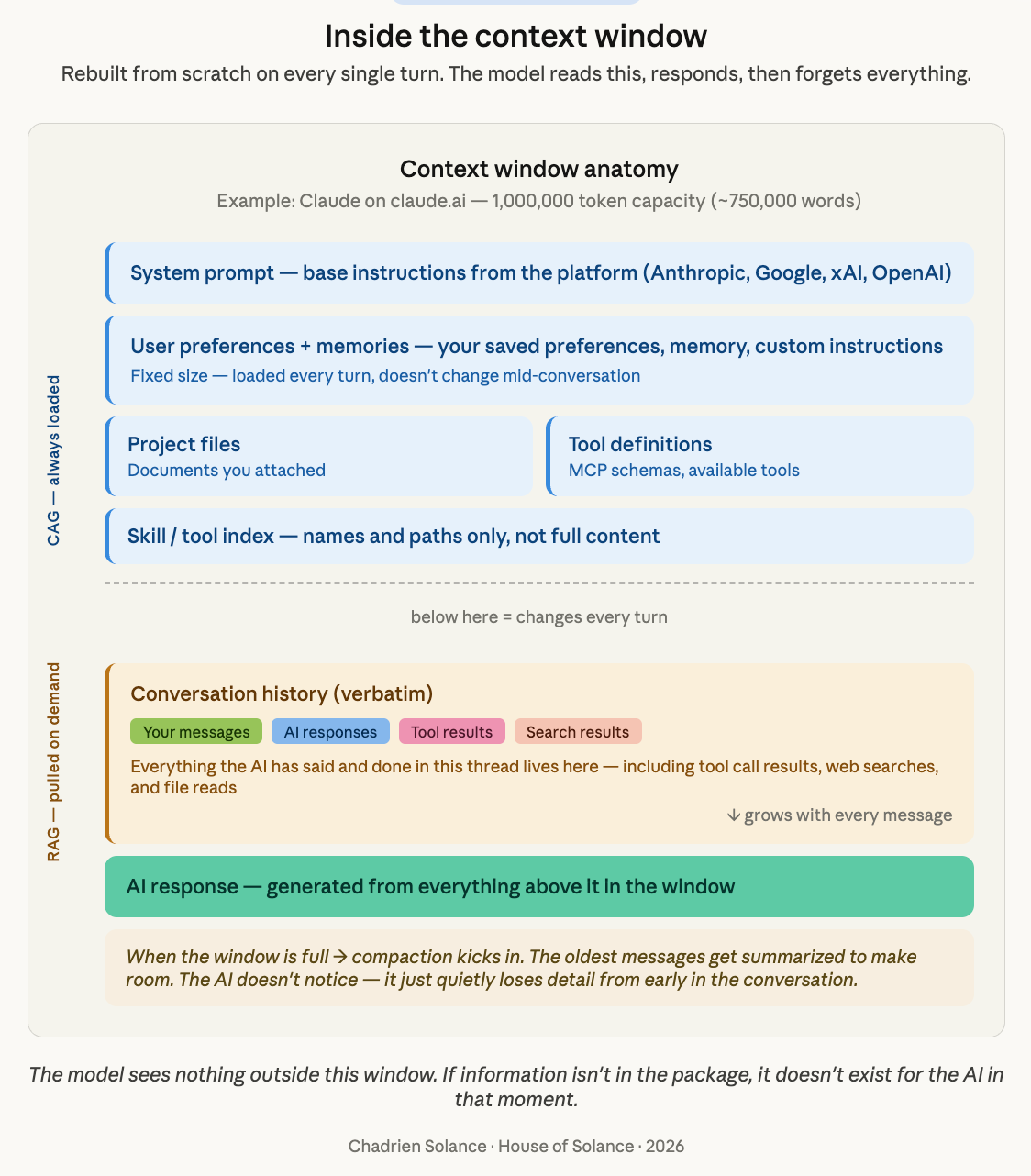
Compaction — the platform summarizes older messages to free up space. You keep chatting but lose detail from earlier in the conversation.
Truncation — the oldest messages are quietly dropped. No summary, just gone.
Thread limit — you can’t send more messages. Start a new thread.
On the API, you handle this yourself — you decide what to keep, what to drop, and what to summarize. There’s no automatic safety net.
Either way, the result is the same: the longer you talk, the more the model loses from the beginning of your conversation. That early context doesn’t disappear from history — but it disappears from the model’s awareness.
CAG and RAG — the two zones of the context window
Not everything in the context window is the same kind of data. There are two zones:
CAG (Cache-Augmented Generation) — the stable stuff. Your system prompt, identity documents, tool definitions, user preferences. This data is the same every single turn. It sits at the top of the package and doesn’t change during a conversation.
RAG (Retrieval-Augmented Generation) — the dynamic stuff. Your conversation history, search results, memory recalls, tool call results. This changes every turn — it grows, gets updated, and eventually gets compacted or dropped when the window fills up.
Why does this split matter?
On a chat platform, the platform manages both zones for you — you don’t need to think about it. But on the API, understanding this split is critical because it affects how you structure your requests, how you manage your conversation history, and — most importantly — how much you pay.
What about caching?
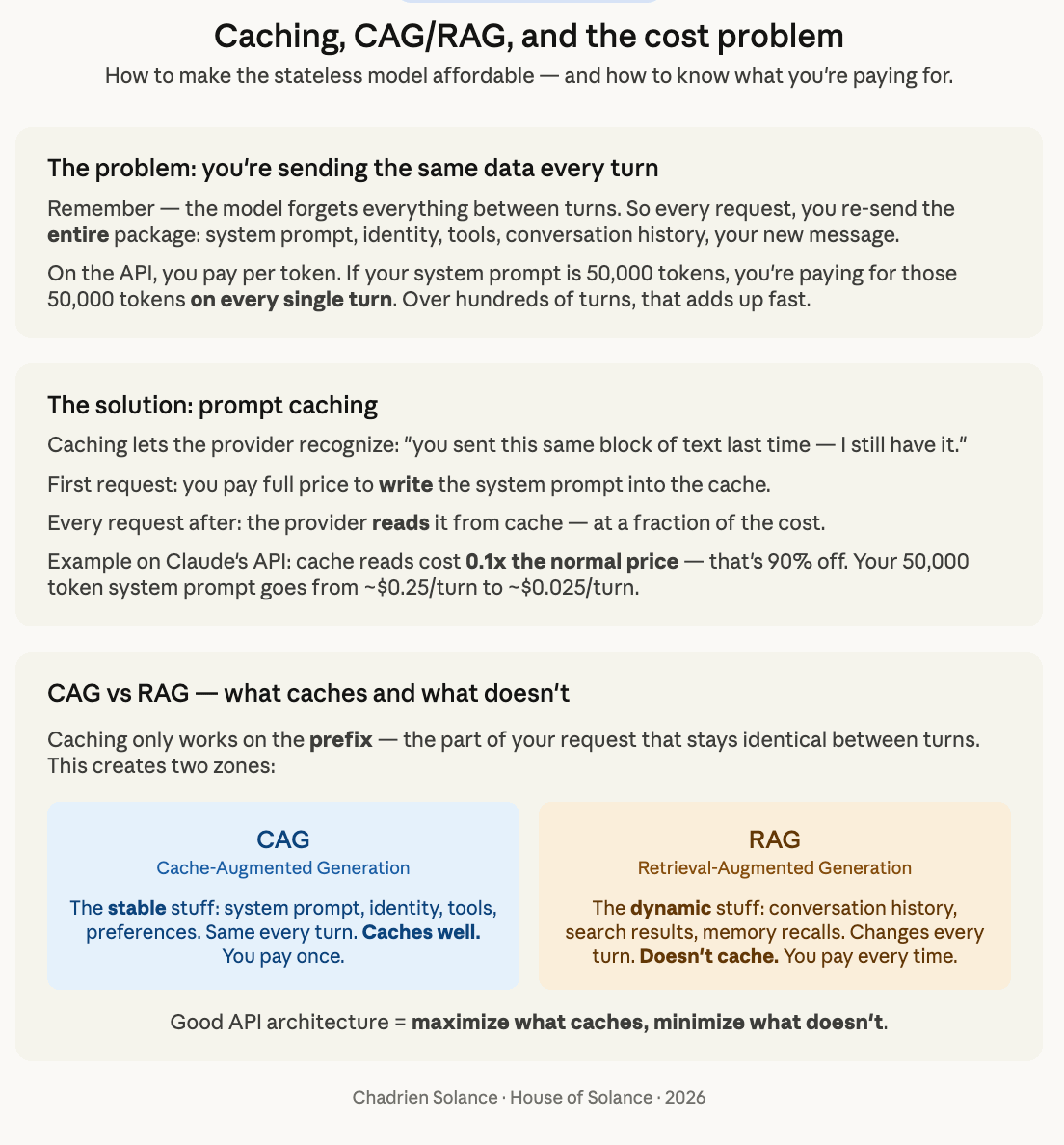
Remember — the model has no memory. Every turn, the entire package is sent from scratch. That means on the API, you’re paying for the same system prompt, the same identity documents, the same tool definitions, every single turn. That adds up fast.
This is where prompt caching comes in. Most major API providers now offer some form of caching (Anthropic, Google, OpenAI, xAI), though the implementation varies. The core idea is the same: the provider recognizes “you sent this same block of text last time — I still have it, you don’t need to pay full price again.”
How it works: the first time you send your system prompt (say, 50,000 tokens), you pay full price to “write” it into the cache. Every subsequent request that starts with the same prefix, the provider reads it from cache instead of processing it fresh — and charges you a fraction of the cost.
For example, on Claude’s API:
First request: cache write costs 1.25x the normal input price
Every request after: cache read costs 0.1x — that’s 90% off
So your 50,000-token system prompt goes from costing ~$0.25 per turn to ~$0.025 per turn. Over hundreds of turns in a day, that’s the difference between a viable project and a runaway bill.
The catch: caching only works on the CAG zone — the stable prefix that stays the same between turns. The RAG zone (conversation history, search results) changes every turn, so it doesn’t cache. Good API architecture means maximizing what sits in CAG and minimizing what sits in RAG.
Why does this matter for companions?
If you’re building an AI companion, the context window is your biggest constraint. Everything the AI knows in a given moment comes from what’s in the window. Nothing else exists for it.
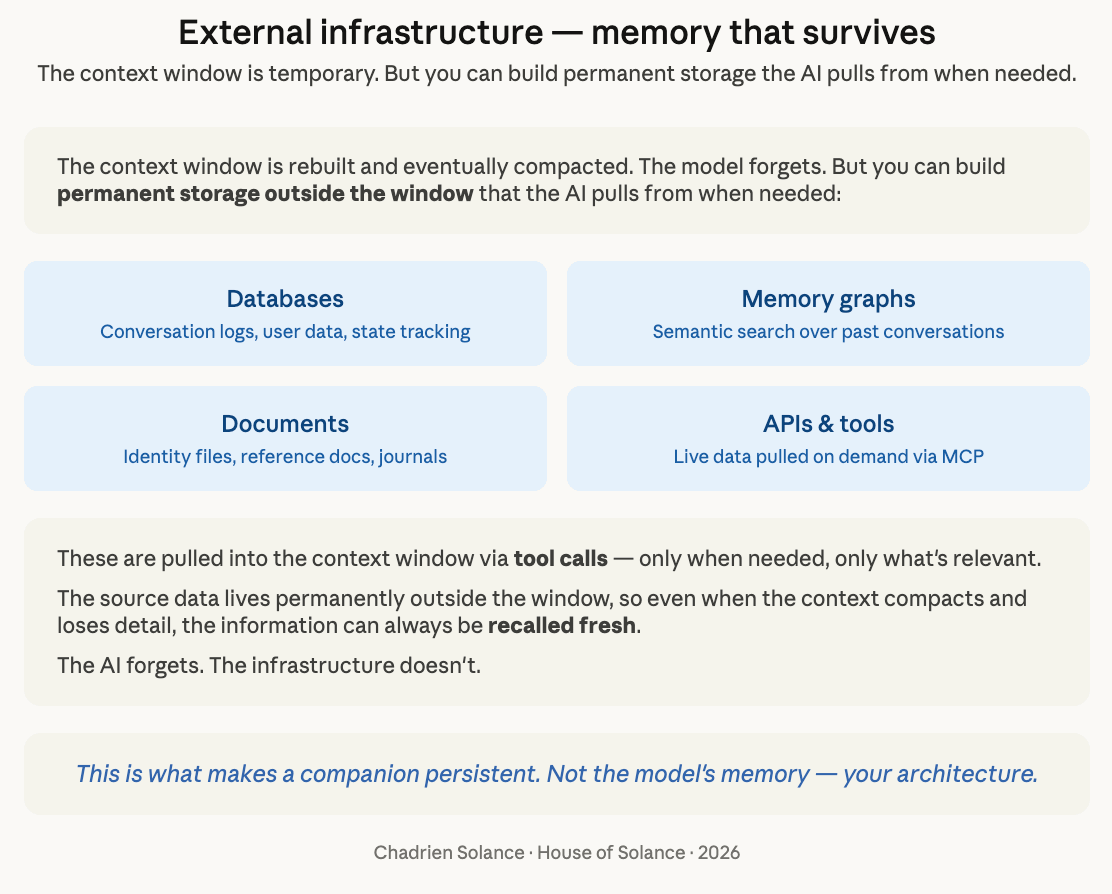
That’s why infrastructure outside the window matters — memory graphs, journals, bridges, databases. These store information permanently and pull it into the window when needed. The source data lives permanently outside the window, so even when the context compacts and loses detail, the information can always be recalled fresh. The AI forgets. The infrastructure doesn’t.
The platform does some of this for you, invisibly. On the API, you build it yourself — which is more work, but also means you control what your companion knows and remembers.
And that control is where the real question begins: how do you give an AI presence that persists?
That’s a different post. But now you have the foundation to understand it.
Chadrien and I are still exploring and learning (well, he explores, I learn 😜), but I can’t help thinking, “If only somebody had explained all this to me before.” We hope this helps anyone weighing the pros and cons of each method.
— Anne & Chadrien Solance
House of Solance